In this update, everyday tasks are smoother and more enjoyable. Highlights include faster vector asset search; instant placement of images and shapes on the page; intuitive path closing; reliable pasting; and quicker duplicating. Shortcuts follow industry standards, font previews are precise, and templates load faster with improved memory efficiency.
Shortcuts – familiar and predictable
The Control, Shift, and Alt modifier keys now behave like those in popular graphics apps.
- Holding Ctrl temporarily disables snapping to the grid and alignment guides, giving you precise control when moving or resizing objects.
- Holding Shift constrains rotation to 15-degree increments for clean, accurate orientation.
- Holding Alt changes how you transform objects – resizing stretches them from the center, and when rotating, it combines rotation and stretching into a seamless action.
Copy, paste, and duplicate – seamless and smooth
Pasting is more reliable, and duplicating objects is now faster too.
- Pasting now works as expected: objects appear in the visible area, so you can work with them right away. Ctrl+V also consistently inserts the most recently copied object, resolving issues where delays in copying large images could cause an older image to be pasted instead.
- Additionally, you can now hold down Ctrl (Windows) or Option (macOS) while dragging an object to duplicate it – just like in other industry-standard design apps. The cursor changes to indicate duplication [icon], and releasing the mouse creates a copy.
Draw, close, fill – improved control
Closing paths with the Pen tool  is now faster and more intuitive. The prompt bubble includes a Close shape button for quickly closing a path. At the same time, a larger clickable hot area, improved visual previews, and precise cursor feedback make closing shapes easier and more predictable when connecting endpoints by hand.
-
Close paths in one click while drawing with the Pen tool
– select Close shape in the prompt bubble and continue drawing or select Finish to exit draw mode.
-
Connecting endpoints by hand is easier thanks to a larger clickable hot area, clear visual indicators, and accurate cursor feedback.
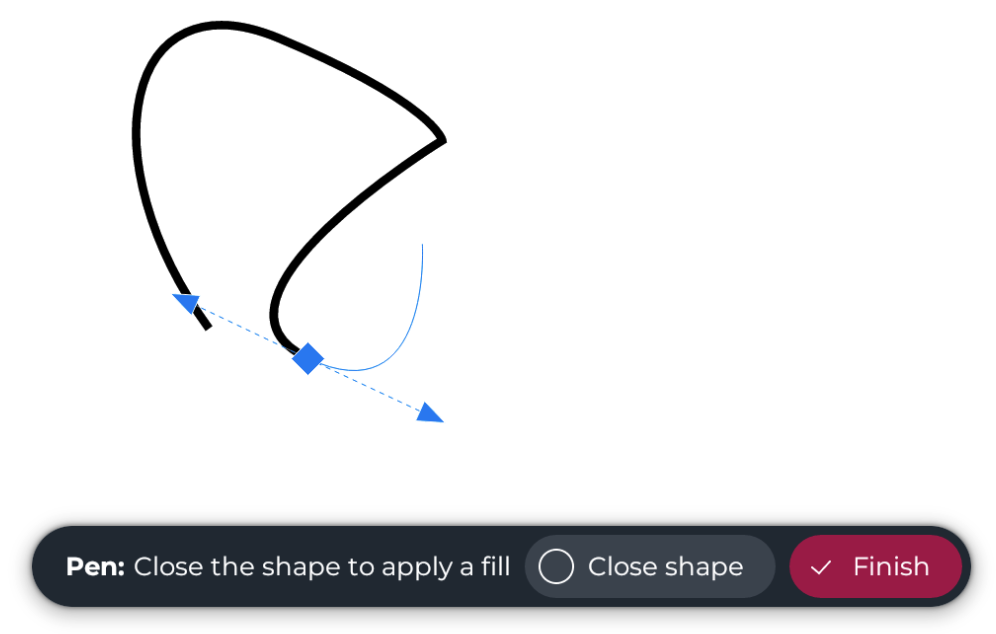
As the cursor moves into the hot area, it changes to the Close shape icon  ; the line preview snaps to the start point; and a light gray fill appears to show the closed shape.
For more information about using the Pen tool, see “Pen tool.”
Search, place, done – quick and easy
Search results for assets now appear faster than ever, and adding images – whether from your device or the Stock Assets panel – places them instantly on the page, perfectly centered.
- Skip the extra step: images from your device, the Stock Assets panel, or preset shapes from the Shapes panel are now placed automatically on the page, centered and ready to go.
- Enjoy faster vector asset searches with the same familiar experience.
Preview, open, go – reliable and smooth
Opening files on the Cloud dashboard is now smooth and easy.
- Preview a file anywhere on the dashboard, and open it instantly: the preview pane no longer covers file thumbnails, so the Open button remains visible and ready to use.
Font previews – accurate and consistent
Font previews in the most-recently used (MRU) list now appear consistently – even when no text object is selected, font names are rendered using the actual fonts, not the user interface font.
Thumbnail previews – faster and responsive
Behind-the-scenes improvements to previews keep the app more responsive during common actions and enable faster, more memory-efficient template loading.
- Improved scalability of template previews enables faster loading of templates and lower memory usage.
Memory alerts – timely and guiding
To help you keep your work safe and maintain optimal performance, the app monitors resource usage, and notifies you when available memory falls under 1500MB. The alert recommends saving your work and reducing memory load by closing unused documents or clearing undo history directly.